> For the complete documentation index, see [llms.txt](https://ainur.gitbook.io/unideck-docs/llms.txt). Markdown versions of documentation pages are available by appending `.md` to page URLs; this page is available as [Markdown](https://ainur.gitbook.io/unideck-docs/user-manual/getting-started-with-unideck/create-an-account-or-log-in.md).
# Create an Account or Log In
### Use UniDeck Without an Account
Not ready to sign up just yet? No problem.\
You can explore UniDeck and start building dashboards right away — no registration required.\
You'll have access to a limited set of **basic widgets** to try things out and see how UniDeck fits into your workflow.
Perfect for quick setups, temporary use, or testing ideas.
***
### Create an Account or Log In
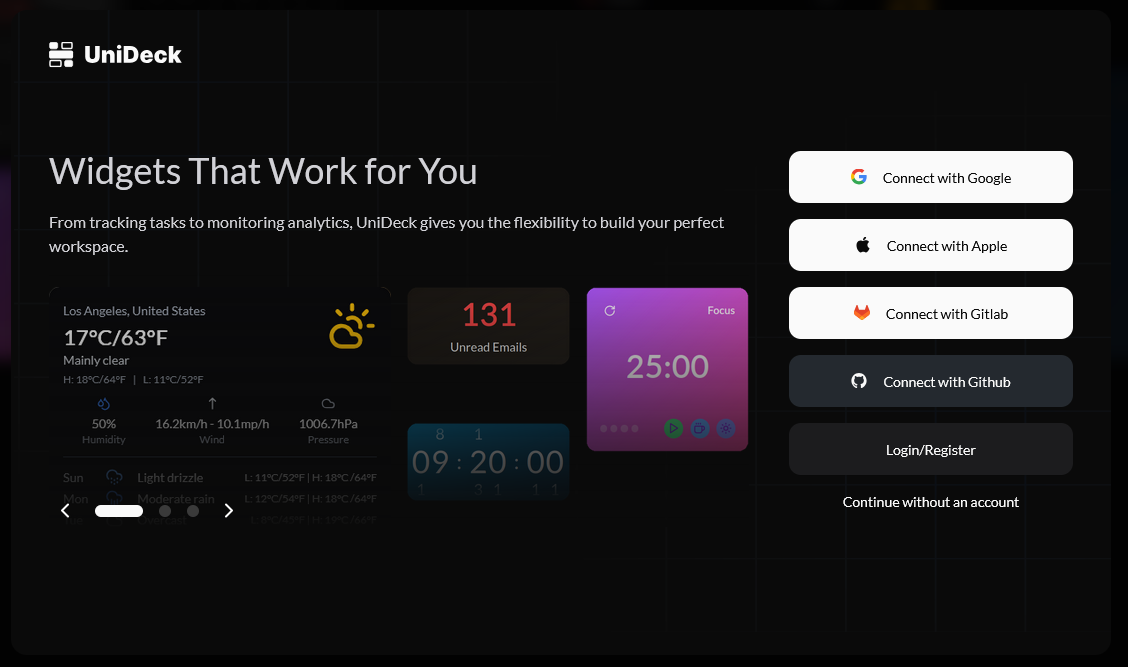
UniDeck's Login Modal
To unlock the full power of UniDeck, including saving your dashboards, syncing across devices, connecting integrations, and accessing advanced widgets, you’ll need an account.
Choose the sign-in method that suits you best:
* **Google**
* **Apple**
* **GitHub**
* **GitLab**
* **Email + Password**
{% hint style="success" %}
Please keep in mind that you can connect many more providers and integrations later in settings. We've just tried to keep things simple and clear with our registration flow.
{% endhint %}
***
### What is the difference between Register and Login?
Creating an new account or logging into an existing one are no different. You can use the same flow and just click on the **Login/Register** button on the login modal.
***
### Why create an account?
Here’s what you’ll get:
* Save & sync your dashboards across all your devices
* Access advanced widgets like Graphs, Tables, and Live Data Views
* Connect integrations like Google Calendar, GitHub, Jira, Outlook, and more
* Use AI-powered automation and insights
* Customize layouts and themes to your needs
***
If you've been using UniDeck without an account and are ready now, just click **Login/Register** in the top right of the app to begin.
UniDeck's Control Bar
Build smarter. Work better. Welcome to [UniDeck](https://dash.unideck.app/)